

- 앙상블 기법, 배깅과 부스팅의 원리와 장단점
- 과적합과 과소적합을 구별하고 해결 방안
- 하이퍼파라미터 튜닝으로 모델 최적화 방법
한문장 요약!
여러 모델을 결합하고, 손실 함수를 활용해 예측 오류를 측정하며 과적합 방지/하이퍼파라미터 튜닝 -> 모델 성능 최적화
앙상블 기법
- 여러 개의 모델을 조합
- 하나의 모델보다 더 좋은 예측 성능
왜 사용?
- 서로 다른 관점(모델)을 결합함으로써 오류를 줄임
- 개별 모델의 편향과 분산을 상호 보완
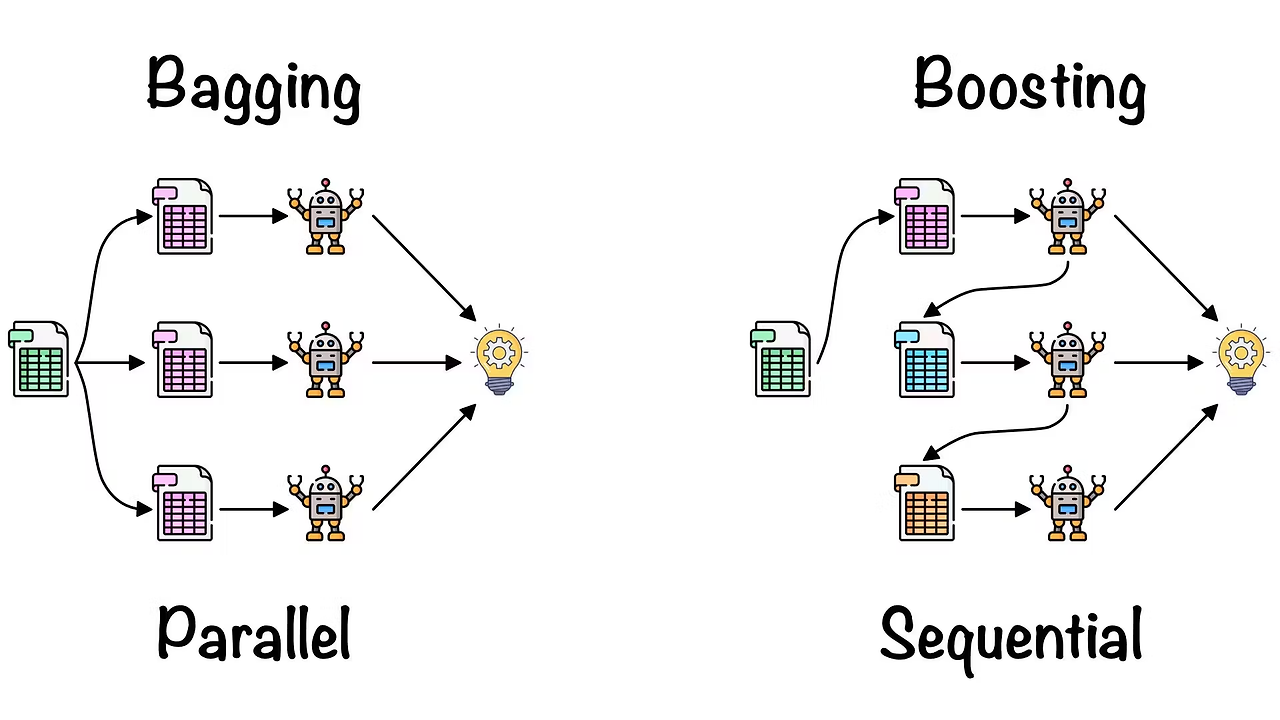
배깅
학습 데이터를 무작위로 여러 부분 샘플(부트스트랩)로 나누어 각각 독립적으로 모델 학습
: 예측시 여러 모델의 결과를 평균 -> 회귀 | 다수결 -> 분류
예시 :
랜덤 포레스트 - 분류, 회귀 모두 가능
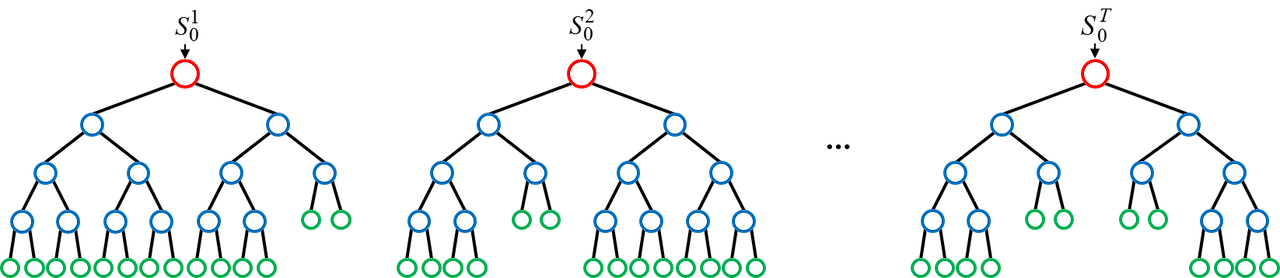
결정 트리 여러 개를 만들 때, 각 트리에 사용하는 피처와 데이터 샘플을 무작위로 선택(피처 샘플링 + 데이터 샘플링)
장점
- 각 모델이 독립적 -> 병렬적 처리 가능, 속도가 빠름
- 모델 간 상호 간섭이 적어 안정적
- 과적합을 줄여줌 (예측의 분산 감소)
단점
- 많은 수의 모델을 학습 -> 메모리 사용량이 많아짐
- 해석이 어려움
▼ 랜덤 포레스트 코드 예시
from sklearn.datasets import load_breast_cancer
from sklearn.model_selection import train_test_split
from sklearn.ensemble import RandomForestClassifier
from sklearn.metrics import accuracy_score, confusion_matrix, classification_report

# 1. 데이터 로드
data = load_breast_cancer()
X = data.data
y = data.target

# 2. 학습/테스트 분할
X_train, X_test, y_train, y_test = train_test_split(
    X, y,
    test_size=0.2,
    random_state=42,
    stratify=y
)

# 3. 랜덤 포레스트 모델 생성
# n_estimators는 사용할 트리의 개수, max_depth는 각 트리의 최대 깊이를 의미하며
# 위 2개의 값을 높일 수록 시간과 연산량은 늘어나지만 더욱 복잡한 특징을 잡을 수 있음
rf_model = RandomForestClassifier(
    n_estimators=100,
    max_depth=None,
    random_state=42
)

# 4. 모델 학습
rf_model.fit(X_train, y_train)

# 5. 예측
y_pred = rf_model.predict(X_test)

# 6. 성능 평가
acc = accuracy_score(y_test, y_pred)
cm = confusion_matrix(y_test, y_pred)
report = classification_report(y_test, y_pred)

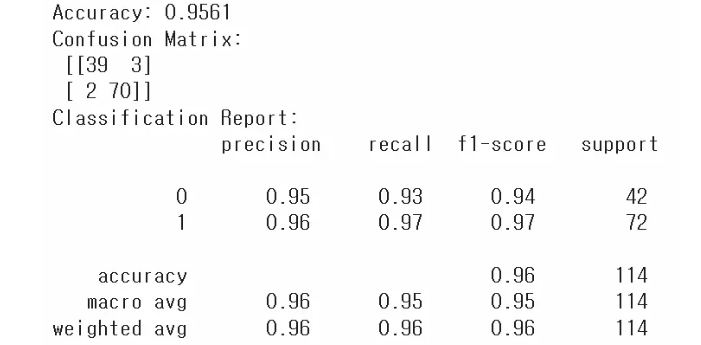
print(f"Accuracy: {acc:.4f}")
print("Confusion Matrix:\n", cm)
print("Classification Report:\n", report)
* 앙상블 모델은 세팅값(n_estimators, max_depth)에 따라서 성능이 변하기 때문에 조절해가면서 확인해보는 것이 좋음
부스팅
순차적으로 모델을 학습하면서 이전 모델이 만든 예측 오류를 보정하도록 설계
각각의 모델은 이전 모델이 틀린 부분에 가중치를 더 두어서 학습

대표 알고리즘 - 분류 회귀 모두 가능 (🔥 다 좋고 예측성능 우수, 자주사용)
1. XGBoost (Extreme Gradient Boosting)
2. LightGBM
3. CatBoost
장점
- 높은 정확도 달성 가능
- 각 단계에서의 오류 보정 -> 복잡한 데이터 패턴 잘 포착 (일반화가 잘 된다!)
단점
- 순차적으로 학습 -> 병렬화가 쉽지 않음
- 하이퍼파라미터가 많고 튜닝이 까다로움
🤖 XGBoost 작동예시 간단 시나리오
1. 기본 모델(약한 결정 트리) 훈련 -> 예측 오류 확인
2. 예측 오류가 컸던 샘플에 높은 가중치 부여
3. 다음 모델(결정 트리) 훈련 -> 다시 오류 보정
4. 이 과정 여러 번 반복 -> 최종 예측 시 모두 합산
▼ XGBoost, LightGBM, CatBoost 코드예시
# 1. 데이터 준비 (Titanic 예시: 범주형 컬럼 존재)
from sklearn.datasets import fetch_openml
import pandas as pd
import numpy as np

# OpenML에서 Titanic 데이터셋 로드
titanic = fetch_openml('titanic', version=1, as_frame=True)
df = titanic.frame

df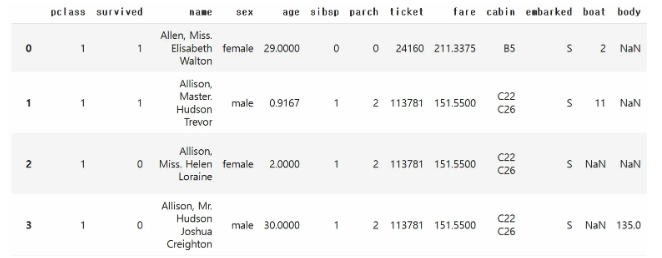
# 주요 컬럼만 사용하고, 결측치가 있는 행 제거(XGB와 Light GBM을 위해)
# pclass(객실 등급, 범주형), sex(성별, 범주형), age(나이, 연속형), fare(티켓 요금, 연속형)
# embarked(탑승항구, 범주형), survived(생존 여부, 타깃)
df = df[['pclass', 'sex', 'age', 'fare', 'embarked', 'survived']]
df.dropna(inplace=True)

df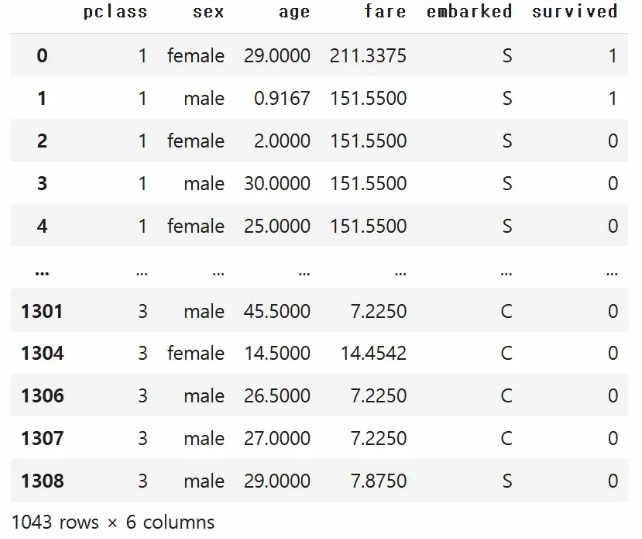
# 입력(X), 타깃(y) 분리
X = df.drop('survived', axis=1)
y = df['survived'].astype(int)  # survived 컬럼을 int형으로 변환

print(X.shape)
print(y.shape)

> (1043, 5)
> (1043, )
# 2. 데이터 전처리
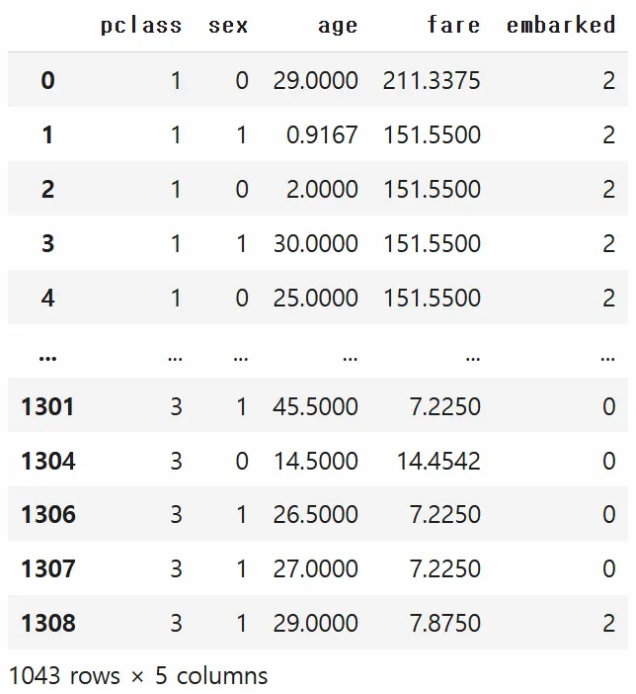
# XGBoost/LightGBM은 숫자형 입력만 허용하므로, 범주형 칼럼을 인코딩
from sklearn.preprocessing import LabelEncoder
cat_cols = ['sex', 'embarked'] # 범주형으로 간주할 컬럼들
for col in cat_cols:
le = LabelEncoder()
X[col] = le.fit_transform(X[col])
X* 사실은 embarked는 순서가 없는 정보(그리고 3가지)이기 때문에 원-핫 인코딩이 좋으나, 편의상 레이블 인코딩을 하였음.
# 3. 학습/테스트 데이터 분할
from sklearn.model_selection import train_test_split

X_train, X_test, y_train, y_test = train_test_split(
    X, y,
    test_size=0.2,
    random_state=42,
    stratify=y
)

print(X_train.shape)
print(y_train.shape)
print(X_test.shape)
print(y_test.shape)

> (834, 5)
> (834, )
> (209, 5)
> (209, )
# 4. XGBoost 실습
# (설치가 필요할 수 있습니다) ! pip install xgboost
from xgboost import XGBClassifier
from sklearn.metrics import accuracy_score, confusion_matrix, classification_report
xgb_model = XGBClassifier(random_state=42)
xgb_model.fit(X_train, y_train)
y_pred_xgb = xgb_model.predict(X_test)
print("=== XGBoost ===")
print("Accuracy:", accuracy_score(y_test, y_pred_xgb))
print("Confusion Matrix:\n", confusion_matrix(y_test, y_pred_xgb))
print("Classification Report:\n", classification_report(y_test, y_pred_xgb))
# 5. LightGBM 실습
# (설치가 필요할 수 있습니다) ! pip install lightgbm
from lightgbm import LGBMClassifier
lgb_model = LGBMClassifier(random_state=42)
lgb_model.fit(X_train, y_train)
y_pred_lgb = lgb_model.predict(X_test)
print("\n=== LightGBM ===")
print("Accuracy:", accuracy_score(y_test, y_pred_lgb))
print("Confusion Matrix:\n", confusion_matrix(y_test, y_pred_lgb))
print("Classification Report:\n", classification_report(y_test, y_pred_lgb))
# 설치 필수!
! pip install catboost

# 6. CatBoost 실습 (범주형 특성 직접 지정 예시)
#    -> 별도의 인코딩 없이도 'cat_features' 인덱스를 지정 가능
# 이전 예시에선 이미 LabelEncoder로 숫자로 바꿨지만,
# CatBoost는 원본 범주형(문자열) 상태로도 학습 가능.

from catboost import CatBoostClassifier

# CatBoost용 데이터 준비: 원본 df에서 결측 제거(위에서 한 것 동일)
df_cat = titanic.frame[['pclass', 'sex', 'age', 'fare', 'embarked', 'survived']].dropna()
X_cat = df_cat.drop('survived', axis=1)
y_cat = df_cat['survived'].astype(int)

X_cat
* 범주형 변수 변환을 하지 않고 바로 진행!!
# cat_features 인덱스: 'sex', 'embarked' 컬럼(원본 df에서의 컬럼 인덱스)
# DataFrame 사용 시에는 컬럼 이름이 아니라 "열의 위치"를 지정해야 함
#   - pclass : 0, sex: 1, age: 2, fare: 3, embarked: 4
cat_features_idx = [1, 4]

X_cat_train, X_cat_test, y_cat_train, y_cat_test = train_test_split(
    X_cat, y_cat, test_size=0.2, random_state=42, stratify=y_cat
)

cat_model = CatBoostClassifier(
    cat_features=cat_features_idx,
    verbose=1,           # 학습과정 확인 가능
    random_state=42
)
cat_model.fit(X_cat_train, y_cat_train)
y_pred_cat = cat_model.predict(X_cat_test)

print("\n=== CatBoost ===")
print("Accuracy:", accuracy_score(y_cat_test, y_pred_cat))
print("Confusion Matrix:\n", confusion_matrix(y_cat_test, y_pred_cat))
print("Classification Report:\n", classification_report(y_cat_test, y_pred_cat))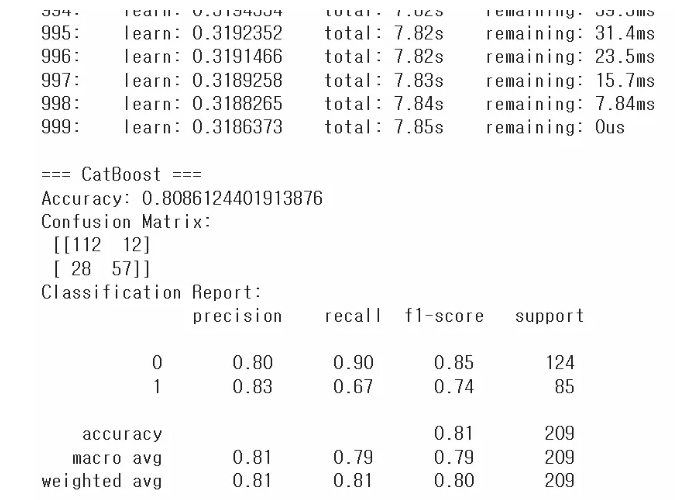
과적합(overfitting) vs 과소적합(underfitting)
과적합(Overfitting)
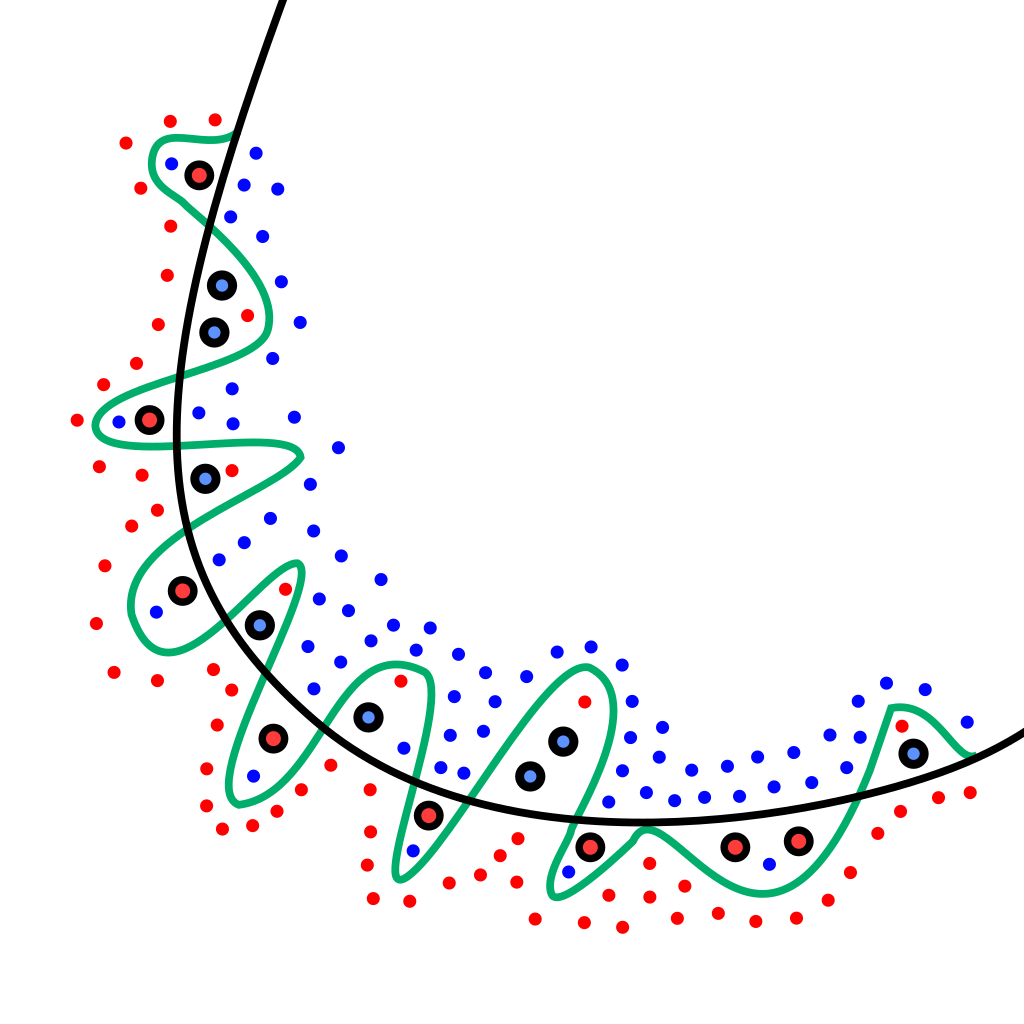
일반화가 잘 안된 상황 (학습 데이터에는 지나치게 최적화되어서, 테스트 데이터에는 성능이 떨어지는 현상)
▼ 이미지
과적합의 원인
- 모델의 파라미터(자유도)가 너무 많아서 복잡도 과다
- 학습 데이터 수가 충분하지 않음
- 너무 많은 에폭(딥러닝 등)으로 학습 -> max_iter (반복)이 너무 큼
- 노이즈가 많은 훈련 데이터에서 패턴을 과하게 학습
과적합 해결 방법
✔️ 규제(Regularization) 기법
예. L1, L2 규제 : 가중치(모델 파라미터)에 패널티를 줘서 과도한 학습 억제 (penalty = 'L1' or 'L2')
✔️ 드랍아웃(Dropout, 딥러닝에서 주로 사용)
학습시 일부 뉴런을 랜덤하게 비활성화 -> 과적합 완화
그때 그때마다 신경망의 모양이 달라짐 -> 그때마다 계산이 달라짐 -> 마치 여러개 모델 사용하여 결과를 합친 느낌!
✔️ 데이터 증강(Data Augmentation)
- 이미지 데이터 -> 회전, 이동, 반전 등
- 자연어 데이터 ->유사한 패턴으로 증강 가능
- 신호 데이터 -> 가우시안 노이즈를 추가하여 증강 가능
✔️ 조기 종료(Early Stopping)
학습 도중 검증 손실이 증가하기 시작하면 학습 중단
✔️ 앙상블(Ensemble)
서로 다른 모델을 결합하여 과적합 위험을 줄임
과소적합(Underfitting)
학습이 잘 안된 상황 (학습 데이터 조차도 충분히 맞추지 못하는 현상)
▼ 이미지
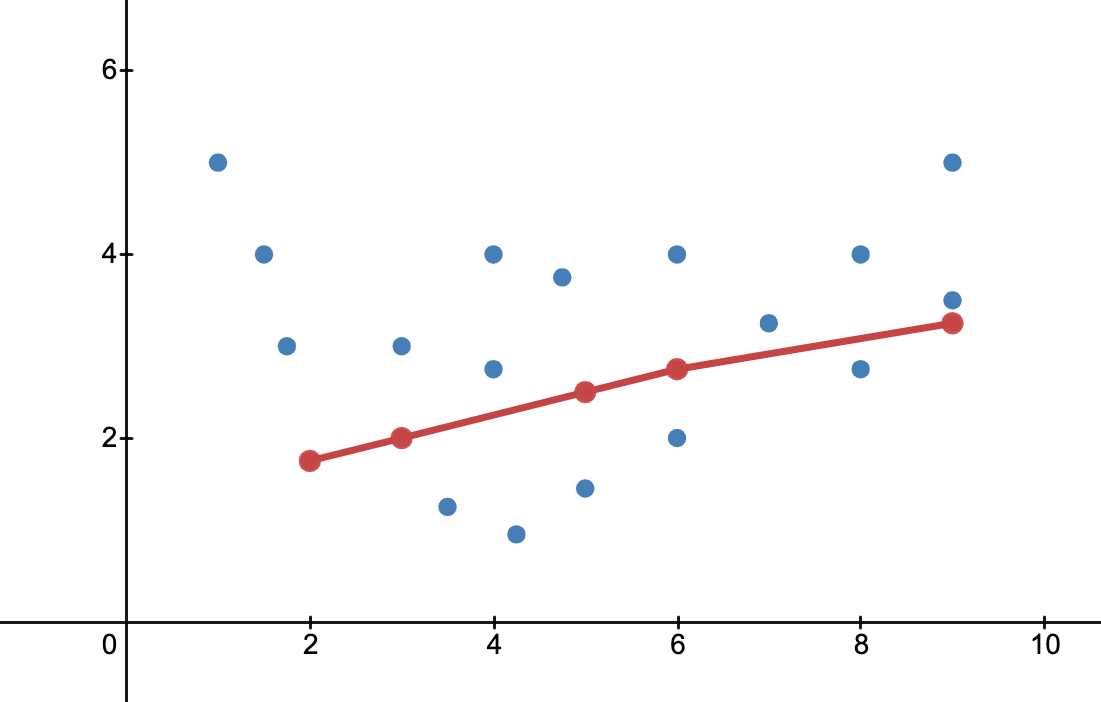
과소적합 해결 방법
- 모델 복잡도 증가
- 더 오래 학습
- 모델 구조 변경(더 깊은 신경망, 더 많은 트리 등)
하이퍼 파라미터 튜닝
✔️ 학습을 시작하기 전에 모델 외부적으로 사람이 설정해주는 값
예. 결정 트리의 최대 깊이(max_depth), 학습 횟수 등
하이퍼 파라미터 튜닝을 위한 데이터 준비
데이터셋 분할(Training/Validation/Test)
- Training Set : 모델 학습에 직접 사용
- Validaton Set : 하이퍼 파라미터 튜닝이 모델 선택을 위해 사용
- Test Set : 최종 성능 평가(훈련/검증 단계에 절대 포함되면 안 됨)
교차 검증(Cross-Validation)
데이터를 훈련 세트와 검증 세트로 여러 번 겹치지 않게 나누어 사용
- K-Fold Cross-Validation:
- 데이터를 K개의 폴드(Fold)로 난어, 순차적으로 한 폴드를 검증 세트로 사용하고 나머지를 훈련에 사용
- 평균 성능을 최종 모델의 성능으로 본 다.
- 장점 : 데이터가 적은 상황에서 안정적인 성능 평가 가능
튜닝 방법
1. Grid Search
하이퍼파라미터 후보의 모든조합을 시도
완전 탐색 -> 최적값 놓치지 않음 but, 후보가 많으면 연산량 급증
▼Grid SearchCV 코드
from sklearn.datasets import load_iris
from sklearn.model_selection import train_test_split, GridSearchCV
from sklearn.ensemble import RandomForestClassifier
from sklearn.metrics import accuracy_score

# 1. 데이터 로드
iris = load_iris()
X = iris.data
y = iris.target

# 2. 학습/테스트 데이터 분할
X_train, X_test, y_train, y_test = train_test_split(
    X, y,
    test_size=0.2,
    random_state=42,
    stratify=y
)

# 3. 하이퍼 파라미터 후보군 설정
param_grid = {
    'n_estimators': [50, 100, 200],
    'max_depth': [None, 5, 10]
}

# 4. GridSearchCV 생성
rf = RandomForestClassifier(random_state=42)
grid_search = GridSearchCV(
    estimator=rf,
    param_grid=param_grid,
    cv=5,              # 교차검증(fold) 횟수
    scoring='accuracy',
    n_jobs=-1,          # 병렬 처리(가능한 모든 코어 사용)
)

# 5. 학습(그리드서치 수행)
grid_search.fit(X_train, y_train)

# 6. 최적 파라미터 및 성능 확인
print("Best Parameters:", grid_search.best_params_)
print("Best CV Score:", grid_search.best_score_)

# 7. 테스트 데이터 성능 확인
best_model = grid_search.best_estimator_
y_pred = best_model.predict(X_test)
test_acc = accuracy_score(y_test, y_pred)
print("Test Accuracy:", test_acc)
2. Randomized Search
임의로 샘플링된 조합을 일정 횟수만 시도
다양한 영역을 빠르게 탐색 가능 but, 최적 조합을 놓칠 수 있음
3. 베이지안 최적화(Bayesian Optimization)
과거 탐색 결과를 바탕으로 가장 유망한 하이퍼파라미터 범위를 중심적으로 탐색
탐색 시간이 더 짧고 효율적 but, 구현 복잡도 높음
머신러닝 추가 개념
최적화 (optimization)
- 하이퍼파라미터 튜닝 : GridSearchCV, RandomizedSearchCV 등
- 피처 엔지니어링 : 새로운 파생 변수 생성, 불필요한 변수 제거
- 과적합 방지 : 교차검증, 규제 적용, 드롭아웃 등
배포 (deployment)
- 학습 완료 모델을 운영 환경에 배포
- API 서버 구축, 클라우드(AWS, GCP) 또는 엣지 디바이스(임베디드 환경)
- 지속적인 모니터링
MLOps(머신러닝 운영)
- Machine Learning + DevOps의 합성어
- 머신러닝 모델 개발부터 배포, 모니터링, 재학습, 롤백 등 전 과정을 자동화 하고 효율적으로 운영하는 방법론
- 왜 중요? 프로젝트 완성 -> 실제 운영 단계에서 지속적인 모니터링과 데이터/모델 업데이트가 필요
모델 해석 가능성 (Explainable AI, XAI)
왜 필요해?
- 머신러닝, 특히 딥러닝 모델은 블랙박스처럼 동작
- 의료/금융 등 규제 산업에서는 "왜 이런 결과가 나왔는지"에 대한 설명 요구
주요 기법
- LIME (Local Interpretable Model-agnostic Explanations) -> 개별 데이터의 중요도
- SHAP (Shapley Additive Explanations)
- Feature Importance 시각화 (트리 기반 모델)
▼ Feature Importance 코드
import matplotlib.pyplot as plt
from sklearn.datasets import load_iris
from sklearn.model_selection import train_test_split
from sklearn.ensemble import RandomForestClassifier

# 1. 데이터 로드
iris = load_iris()
X = iris.data
y = iris.target
feature_names = iris.feature_names

# 2. 학습/테스트 데이터 분할
X_train, X_test, y_train, y_test = train_test_split(
    X, y,
    test_size=0.2,
    random_state=42,
    stratify=y
)

# 3. 랜덤 포레스트 모델 학습
rf = RandomForestClassifier(random_state=42)
rf.fit(X_train, y_train)

# 4. 피처 중요도 추출
importances = rf.feature_importances_

# 5. 시각화
plt.bar(range(len(importances)), importances)
plt.xticks(range(len(importances)), feature_names, rotation=45)
plt.xlabel("Feature")
plt.ylabel("Importance")
plt.title("Feature Importances in RandomForest")
plt.tight_layout()
plt.show()

# 가장 중요한 변수
most_important_idx = importances.argmax()
most_important_feature = feature_names[most_important_idx]
print("가장 중요한 변수:", most_important_feature)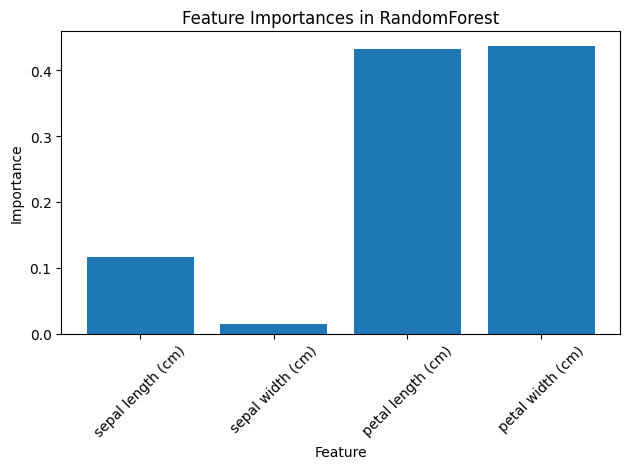
'머신러닝' 카테고리의 다른 글
| [ML] 머신러닝 7강 - 그룹을 나누려면, 클러스터링 (0) | 2025.11.19 |
|---|---|
| [ML] 머신러닝 5강 - 무엇인지 맞추고 싶으면 분류! (1) | 2025.11.18 |
| [ML] 머신러닝 4강 - 값을 예측하고 싶을 땐 회귀 (0) | 2025.11.18 |