

✍️ 프로젝트 8일차 요약 : 발표자료 피드백 내용 수정
개인 진행사항
- 전체적인 코드 확인 및 검토
팀 진행 및 결정 사항
- 발표자료 피드백 수정
- 목차 추가
- 주요컬럼 선정 이유 추가
- 이상치 처리 관련 : 가격이 단지 크다의 표현은 애매 -> 어떻게 큰지 극단값 언급
- 결측치 처리 관련 : 결측치를 최빈값으로 처리했지만, 만약 평균/중앙값으로 대체시 소숫점이 나올 수 있는데 이를 어떻게 처리할 것인지(내릴지, 올릴지 등)에 대한 인지 필요
- 통계 관련 : 비즈니스 해석 강조
- 해당 사후검정을 왜 사용했는지에 대한 이해
- 전반적으로 발표를 듣는 사람이 잘 이해할 수 있도록 핵심내용은 발표자료에 추가
오늘의 회고
프로젝트 진행 중 취합한 전처리 코드 파일에서 새롭게 알게되거나 학습해두면 좋을 내용들 (주관적인 선정)
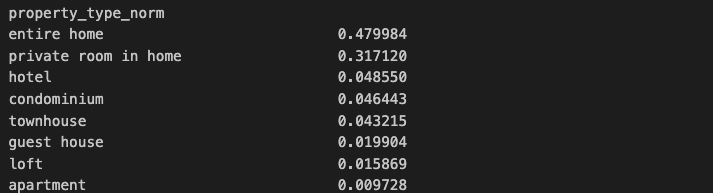
1. .value_counts(normalize=True) :
- 특정 열 또는 시리즈에 있는 각 고유값의 상대적 빈도를 비율로 계산.
- 결측치 처리: dropna=False와 함께 사용하면 결측치(NaN)도 포함하여 비율을 계산.
share = df_cols["property_type_norm"].value_counts(normalize=True)▼ 출력 결과
2. ax.bar_label(ax.containers[0], fmt='{:,.0f}', padding=3) :
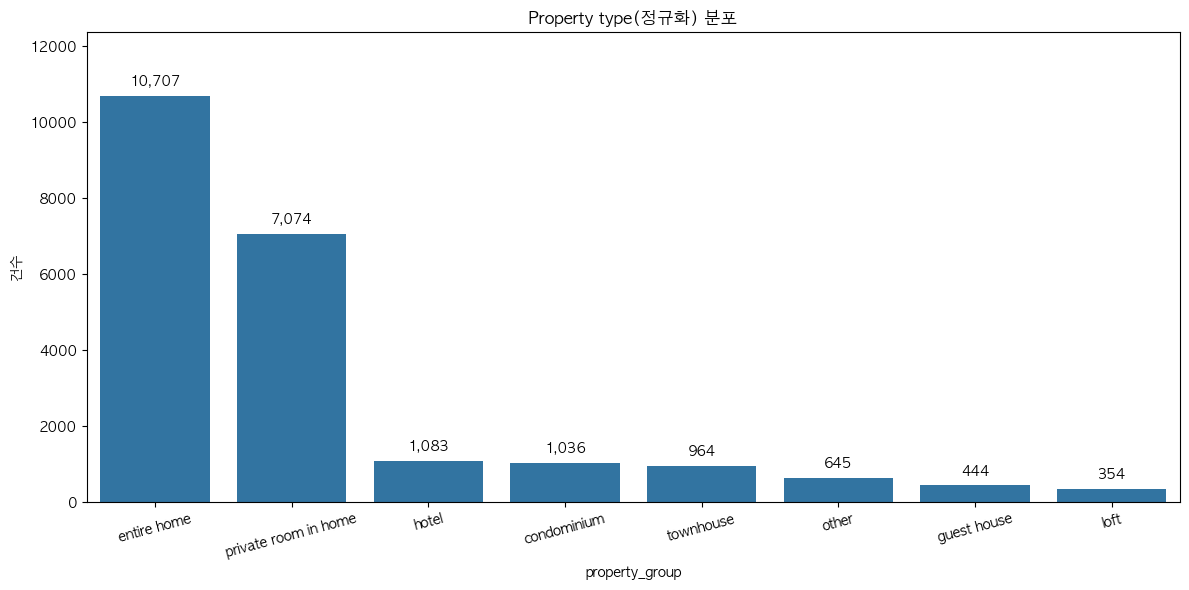
- 막대그래프(bar chart) 위에 값을 표시해주는 함수
- ax.bar()로 막대를 그리면, 각 막대들의 묶음이 ax.containers 라는 리스트에 저장
- ax.containers[0]은 첫 번째 막대 묶음을 의마함.
- fmt= : 표시형식을 정함 | , → 천 단위 구분기호(예: 1,000) | .0f → 소수점 없이 정수로 표시
- padding= : 막대와 숫자 사이의 간격 조정 (클수록 막대와 멀어짐)
import seaborn as sns
import matplotlib.pyplot as plt

order = df_cols["property_group"].value_counts().index
ax = sns.countplot(data=df_cols, x="property_group", order=order)
ax.set_title("Property type(정규화) 분포"); ax.set_xlabel("property_group"); ax.set_ylabel("건수")
ax.bar_label(ax.containers[0], fmt='{:,.0f}', padding=5)
ax.set_ylim(0, ax.get_ylim()[1]*1.10)
plt.xticks(rotation=15)
plt.tight_layout(); plt.show()
▼ 그래프
3. 왜도(skewness)와 첨도(kurtosis)
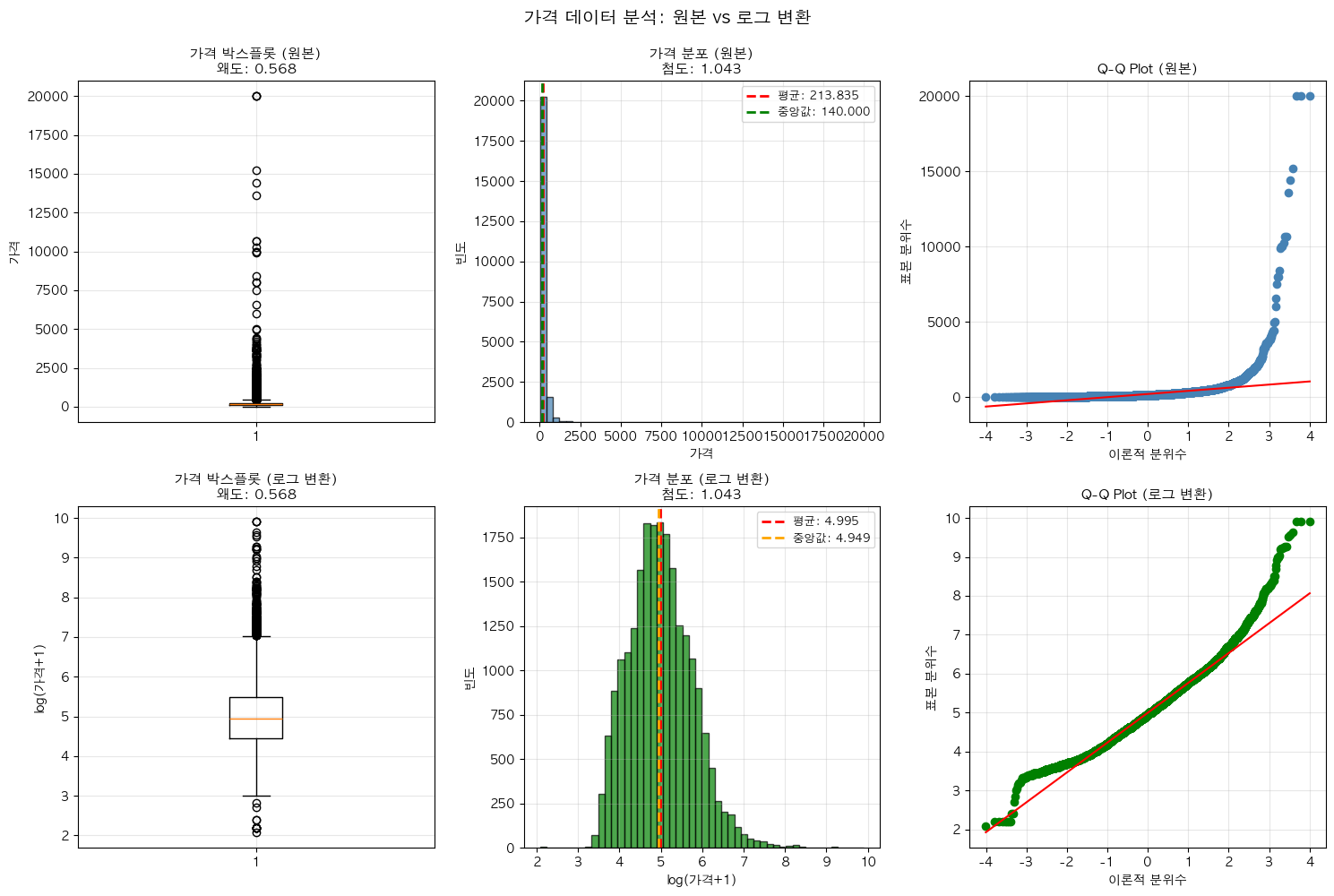
- 데이터의 분포 모양을 설명하는 통계 지표로,
- 왜도 : 정규분포를 기준으로 데이터가 얼마나 치우쳤는지(비대칭성)와
- > 0 (양의 왜도) : 오른쪽 꼬리가 길다. 오른쪽에 극단값 많음(예: 소득 분포)
- < 0 (음의 왜도) : 왼쪽으로 꼬리가 길다. 왼쪽에 극단값이 많음
- 첨도 : 얼마나 뾰족하거나 납작한지(꼬리 두께)를 판단
- > 3 : 뾰족한 분포, 꼬리가 두꺼움, 극단값 많음
- < 3 : 납작한 분포, 꼬리가 얇음, 극단값 적음
- 왜도 : 정규분포를 기준으로 데이터가 얼마나 치우쳤는지(비대칭성)와
💡 보통 파이썬의 scipy.stats.kurtosis()는 Fisher 보정값(−3)을 반환합니다.
즉, 정규분포는 첨도 = 0 으로 나온다.
4. subplots : 여러 개의 그래프 그리기
fig, axes = plt.subplots(2, 3, figsize=(15, 10))- "2행, 3열로 그래프 6개를 그릴거야" 라는 의미
- 구체적인 코드는 아래 참고 ▼
더보기
# 시각화 - 원본 vs 로그 변환 비교
fig, axes = plt.subplots(2, 3, figsize=(15, 10))

# 로그 변환
price_log = np.log1p(df_cols['price'])  # log(price + 1)

# 로그 변환 후 왜도와 첨도
price_log_skew = skew(price_log)
price_log_kurt = kurtosis(price_log)

# ============================================================================
# 첫 번째 행: 원본 데이터
# ============================================================================

# 1. 박스플롯 (원본)
axes[0, 0].boxplot(df_cols['price'])
axes[0, 0].set_title(f'가격 박스플롯 (원본)\n왜도: {price_skew:.3f}',
                     fontsize=11, fontweight='bold')
axes[0, 0].set_ylabel('가격')
axes[0, 0].grid(True, alpha=0.3)

# 2. 히스토그램 (원본)
axes[0, 1].hist(df_cols['price'], bins=50, edgecolor='black', alpha=0.7, color='steelblue')
axes[0, 1].axvline(df_cols['price'].mean(), color='red', linestyle='--',
                    linewidth=2, label=f'평균: {df_cols["price"].mean():.3f}')
axes[0, 1].axvline(df_cols['price'].median(), color='green', linestyle='--',
                    linewidth=2, label=f'중앙값: {df_cols["price"].median():.3f}')
axes[0, 1].set_title(f'가격 분포 (원본)\n첨도: {price_kurt:.3f}',
                     fontsize=11, fontweight='bold')
axes[0, 1].set_xlabel('가격')
axes[0, 1].set_ylabel('빈도')
axes[0, 1].legend(fontsize=9)
axes[0, 1].grid(True, alpha=0.3)

# 3. Q-Q plot (원본)
stats.probplot(df_cols['price'], dist="norm", plot=axes[0, 2])
axes[0, 2].get_lines()[0].set_markerfacecolor('steelblue')  # 점 색상 통일
axes[0, 2].get_lines()[0].set_markeredgecolor('steelblue')
axes[0, 2].set_title('Q-Q Plot (원본)', fontsize=11, fontweight='bold')
axes[0, 2].set_xlabel('이론적 분위수')
axes[0, 2].set_ylabel('표본 분위수')
axes[0, 2].grid(True, alpha=0.3)

# ============================================================================
# 두 번째 행: 로그 변환 데이터
# ============================================================================

# 1. 박스플롯 (로그)
axes[1, 0].boxplot(price_log)
axes[1, 0].set_title(f'가격 박스플롯 (로그 변환)\n왜도: {price_log_skew:.3f}',
                     fontsize=11, fontweight='bold')
axes[1, 0].set_ylabel('log(가격+1)')
axes[1, 0].grid(True, alpha=0.3)

# 2. 히스토그램 (로그)
axes[1, 1].hist(price_log, bins=50, edgecolor='black', alpha=0.7, color='green')
axes[1, 1].axvline(price_log.mean(), color='red', linestyle='--',
                    linewidth=2, label=f'평균: {price_log.mean():.3f}')
axes[1, 1].axvline(price_log.median(), color='orange', linestyle='--',
                    linewidth=2, label=f'중앙값: {price_log.median():.3f}')
axes[1, 1].set_title(f'가격 분포 (로그 변환)\n첨도: {price_log_kurt:.3f}',
                     fontsize=11, fontweight='bold')
axes[1, 1].set_xlabel('log(가격+1)')
axes[1, 1].set_ylabel('빈도')
axes[1, 1].legend(fontsize=9)
axes[1, 1].grid(True, alpha=0.3)

# 3. Q-Q plot (로그)
stats.probplot(price_log, dist="norm", plot=axes[1, 2])
axes[1, 2].get_lines()[0].set_markerfacecolor('green')  # 점 색상 통일
axes[1, 2].get_lines()[0].set_markeredgecolor('green')
axes[1, 2].set_title('Q-Q Plot (로그 변환)', fontsize=11, fontweight='bold')
axes[1, 2].set_xlabel('이론적 분위수')
axes[1, 2].set_ylabel('표본 분위수')
axes[1, 2].grid(True, alpha=0.3)

# 전체 제목
fig.suptitle('가격 데이터 분석: 원본 vs 로그 변환', fontsize=14, fontweight='bold', y=0.995)

plt.tight_layout()
plt.show()
5. IQR 방식으로 이상치를 확인하고 삭제를 할 수 있지만, 삭제하지 않고 백분위수(99.5%) 값으로 대치
# 극단적 상한값 처리 (99.5 백분위수로 대치)
price_cap = df_cols['price_log'].quantile(0.995)
df_cols.loc[df_cols['price_log'] > price_cap, 'price_log'] = price_cap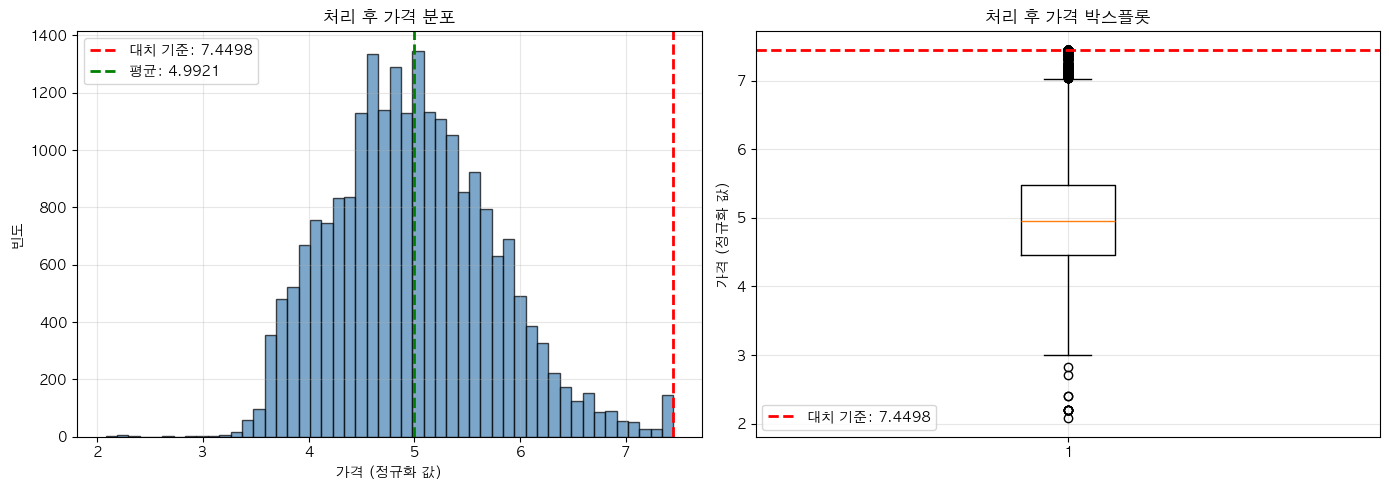
💡 적어도 팀 프로젝트를 진행하면서 작성한 코드 및 내용은 설명할 수 있을 정도로 이해할 것
내일 할 거
- 발표회 D-DAY (A조 2번째 순서)
- 피드백 메모
- 프로젝트 과정 복기
- 다른 조 발표 열심히 들어보기 (머신러닝 파트 궁금해🤔)
끝.
'프로젝트' 카테고리의 다른 글
| [프로젝트 #2-9] 두 번째 프로젝트 발표회가 끝났다(feedback). (0) | 2025.10.23 |
|---|---|
| [프로젝트 #2-7] 통계 파트 정리 후 마무리 가닥이 보인다. (0) | 2025.10.21 |
| [프로젝트 #2-6] 통계분석 내용을 프로젝트에 어떻게 녹여낼까? (0) | 2025.10.20 |